From WordPress to Hugo
The breaking point
We didn’t plan a website relaunch. It happened the way most technical debt stories go: one day you realize you’ve spent more time maintaining the infrastructure than building the actual product.
Our WordPress installation had accumulated years of plugins — security scanners, caching layers, SEO tools, form builders, page builders — each one a dependency that needed updating, testing, and occasionally breaking something else when it did. Every Monday morning started with a small anxiety: what did WordPress auto-update overnight, and did it break anything?
It wasn’t just anxiety. Over the last year, we had repeated outages: an outdated plugin that hadn’t been maintained conflicting with a PHP version update, a theme incompatibility that took the contact form down for a day before we noticed, a caching plugin that served stale pages after a content update and we only found out through a customer. None of these were catastrophic. But each one cost time we didn’t have, and each one was a reminder that we were spending engineering capacity keeping the lights on rather than building anything.
The final push was a combination of things that converged at the same time: we needed a redesign, we wanted a bilingual site (German and English with clean URL structures), and we’d been thinking seriously about what it means to practice sovereignty in our own technical stack. Running a PHP application with a MySQL database on third-party hosting, with half a dozen US-SaaS integrations baked into the page, felt increasingly misaligned with what we tell our customers.
So we did the thing you’re never supposed to do — we rebuilt from scratch.
Why Hugo
We didn’t do a broad market survey. We knew we wanted a static site generator, and we narrowed it down quickly to two candidates: Zola and Hugo.
Zola was the natural first look because we already use it for our developer portal — the technical documentation and API sandbox environment. Zola is written in Rust, ships as a single binary, and has a clean template engine. For our developer portal it’s a good fit, and we’re keeping it there: the technical complexity of the API sandbox integrations makes switching not worth the effort.
For the marketing site, though, we ultimately chose Hugo. The deciding factors were the larger ecosystem of existing shortcode patterns to learn from, better multilingual support out of the box, and a wider base of community examples for the kind of component-heavy marketing pages we needed to build. Both are excellent tools — the choice came down to what fit this specific use case better, not any fundamental shortcoming in Zola.
Hugo is a static site generator written in Go. You feed it Markdown files and Go templates, it outputs HTML. No database, no PHP runtime, no plugin ecosystem to manage. The entire site builds in seconds. The output is a folder of static files you can serve from anywhere.
For a marketing and documentation site — which is what exolynk.com is — this is not a compromise. It’s a better architecture. There’s simply nothing to attack, nothing to patch, nothing to scale.
The specific reasons that tipped us toward Hugo:
Performance without effort. Static HTML served from a CDN edge is fast by default. No query optimization, no caching plugin to configure, no PHP cold starts. Our Lighthouse scores improved dramatically without us doing anything special.
Git as the CMS. Every piece of content, every template, every configuration setting lives in a Git repository. Branching, reviewing, and rolling back changes works the same way it does for our application code. There are no more “database sync” procedures between environments.
Multilingual done right. Hugo has first-class support for multilingual sites. German content lives under /de/, with clean URLs like /de/blog/ and /de/plattform/. Hreflang tags, language switching, and per-language navigation are all handled natively — no plugin, no workaround.
No ongoing security surface. With WordPress, we received near-daily dependency update notifications. With Hugo, the built output is static HTML. There is nothing to update on the server side, and nothing that can be exploited through the web application layer.
What we built
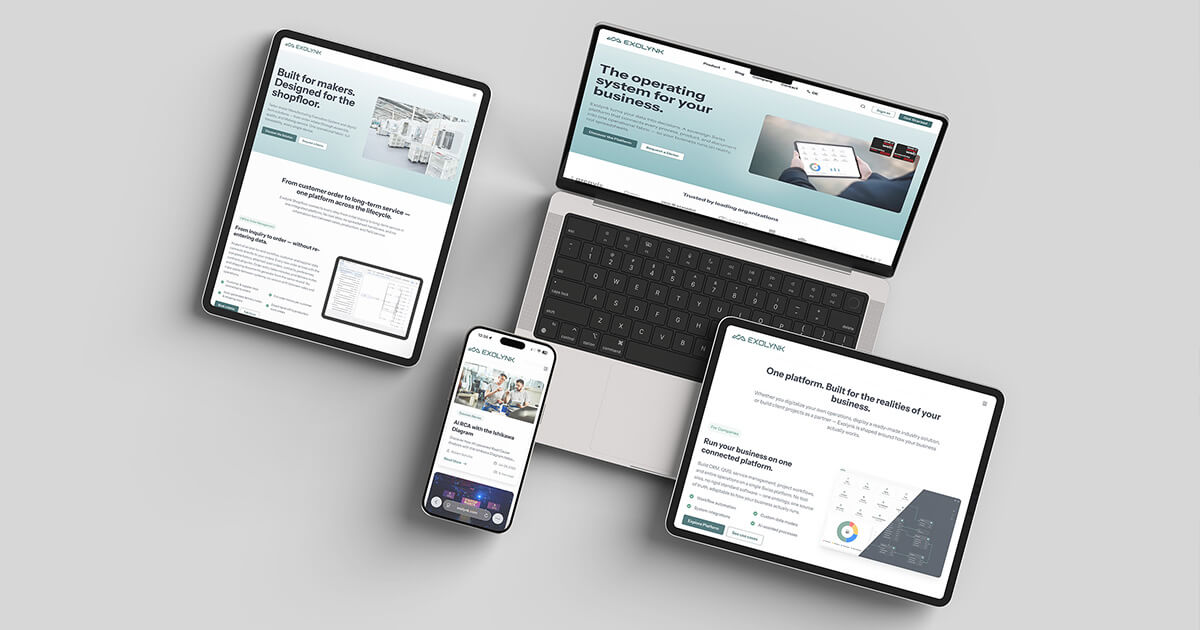
The new site is a custom Hugo theme built from scratch — but not in isolation. It’s part of a larger design system effort that ran in parallel across three projects at once.
One design system, two products. While rebuilding the website, we were simultaneously redesigning the Exolynk platform UI. Rather than treating these as separate projects with separate stylesheets, we made a deliberate decision early on: develop a shared corporate design and centralize the SCSS so that both the platform and the website draw from the same source. Any future brand update — typography, colors, spacing tokens — gets changed once and propagates to both. This was only possible because we did the website and platform redesign at the same time, which added coordination overhead but would have been much harder to retrofit later.
The visual identity behind all of this was developed together with Silja from grafik100.ch , who led the new corporate design. The rebrand touched everything — logo, color system, typography, icon style — and had to work across the marketing website, the application UI, and print materials simultaneously.
Birei: from Rust/Leptos components to a Hugo library. The UI component system we developed for this project is called Birei. It was originally built as a set of Rust Leptos components for the Exolynk platform — interactive, typed, compiled. For the Hugo website, we couldn’t use those components directly. We ported the design language and interaction patterns into a parallel implementation: HTML templates, vanilla JavaScript, and the shared SCSS layer. The result is a component library that looks and behaves consistently across both surfaces, even though the underlying technology is completely different. Buttons, form inputs, cards, navigation elements — the same visual component, two runtimes.
We started with a minimal Go-based Hugo starter as the scaffold, then built the Birei theme on top of it. Nothing from the starter made it to production unchanged; it was a starting point for project structure, not a theme to customize.
A few other things we’re particularly happy with:
A component library in shortcodes. Hugo shortcodes are reusable content components you can drop into Markdown. We built a library of them: hero sections, feature cards, comparison tables, testimonial sliders, YouTube embeds with privacy-friendly lazy loading, timeline components, animated type effects. Adding a new page section means writing one shortcode call, not editing a template or fighting a page builder.
Consent-aware analytics. We replaced Google Analytics with a self-hosted Umami instance running on EU infrastructure. Umami is open-source, cookie-free, and stores no personally identifiable information. We’re keeping Google Analytics running in parallel temporarily — to validate traffic data consistency after the migration — but it will be removed once we’re confident the numbers are comparable. From that point on, all analytics data stays on our own infrastructure.
A privacy-respecting cookie consent flow. Swiss visitors (detected by timezone) are served the site immediately without a consent banner, in line with the Swiss FADP. Non-Swiss visitors see a consent banner before any tracking loads. The implementation runs entirely in vanilla JavaScript with no third-party consent library.
Contact form without external services. Our contact form submits to a PHP handler on the same server that sends mail via our own SMTP. No Formspree, no HubSpot form, no data routed through a US SaaS layer. Spam protection is handled with a honeypot field and a timing heuristic — no CAPTCHA required.
Cal.com booking integration. The “Book a meeting” button across the site opens a modal that lazily loads Cal.com in an iframe — only when the visitor actually clicks it, not on every page load.
Multilingual site search without a search service. We added full-text search powered by Pagefind
— an open-source library that crawls the built HTML and generates a binary search index as part of the npm run build step. The result is a Cmd+K search modal that works offline, covers both English and German content, and requires no Algolia account, no Elasticsearch cluster, no third-party JavaScript on the page. The entire index ships alongside the static files on the same server.
Live platform status in the footer. A small colored indicator in the footer shows the current operational status of the Exolynk platform, fetched live from our Uptime Kuma
monitoring instance. No page reload required — it updates after load via a non-blocking requestIdleCallback fetch. Credit where it’s due: we spotted this pattern on the site of Nine Internet Solutions AG
, who also recently migrated from WordPress to Hugo and were generous enough to share their learnings with us. Their post is well worth reading if you’re considering a similar move — and their SEO experience post-migration gave us useful calibration on what to expect.
By the numbers
Some concrete data from the finished build:
Performance figures are from a WebPageTest side-by-side run on the same day, same test location.
| Metric | WordPress (before) | Hugo (after) | Improvement |
|---|---|---|---|
| First Contentful Paint | 2.997 s | 0.545 s | −82% |
| Largest Contentful Paint | 3.196 s | 0.782 s | −76% |
| Time To First Byte | 1.728 s | 0.119 s | −93% |
| Speed Index | 3.56 s | 1.007 s | −72% |
| Total Blocking Time | 0.339 s | 0.200 s | −41% |
| Total Load Time | 9.379 s | 1.267 s | −87% |
| Page Weight | 28 MB | 5 MB | −82% |
| Total HTTP Requests | 147 | 48 | −67% |
| Cumulative Layout Shift | 0.010 | 0.013 | ≈ same |
| Total pages built | — | 350 (221 EN + 129 DE) | — |
| Redirect aliases | — | 215 (136 EN + 79 DE) | — |
| Hugo build time | — | ~24 s | — |
The Total Load Time bar (9.4 s vs 1.3 s) makes the chart a bit lopsided, but that’s kind of the point.
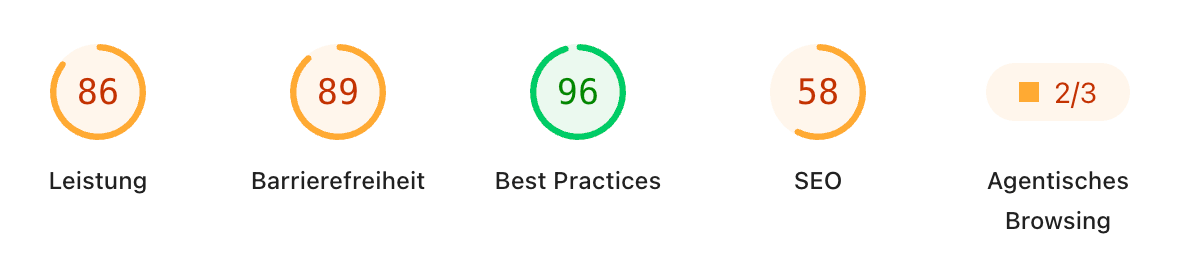
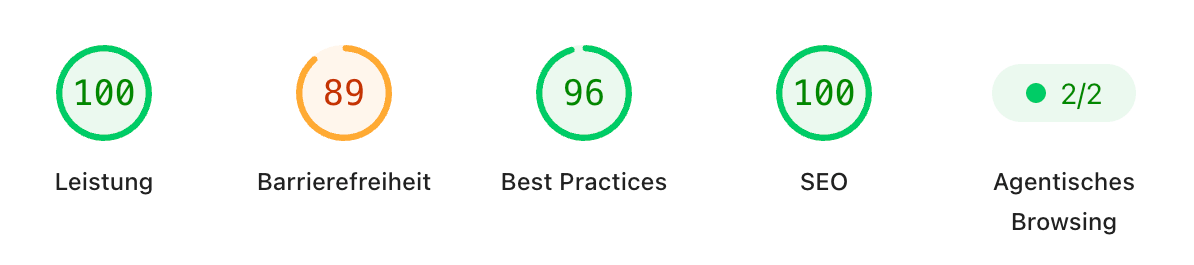
For completeness, here are the PageSpeed Insights scores side by side — measured independently from the WebPageTest run above:
WordPress (before)
Hugo (after)
A note on build time: 24 seconds is longer than the “builds in milliseconds” you’ll read in most Hugo tutorials. Ours runs sha512 integrity fingerprinting across all assets, processes images, and generates 215 redirect stub pages on top of the actual content. For a production build you run once before deployment this is fine. The local dev server with incremental rebuilds is still near-instant for content changes.
The 215 redirect aliases are the redirect archaeology cost made concrete. Every old WordPress URL gets a redirect to its new equivalent, which Hugo generates as a tiny HTML stub page at the old path. No plugin needed, no per-URL .htaccess gymnastics — just a line in the frontmatter.
The AI-assisted development angle
We’ll be honest about something: this rewrite happened in a compressed timeframe partly because we used Claude Code throughout the entire project.
This deserves a nuanced take. AI-assisted development for a project like this is genuinely useful — and genuinely limited in specific ways.
Where it accelerated us significantly:
- Building and iterating on Go templates, which have an unusual syntax that benefits from instant feedback
- Writing and debugging the multilingual configuration, hreflang setup, and redirect rules for the old WordPress URLs
- Implementing the JavaScript-heavy components (consent banner, modal, lazy loading) without spending hours on browser compatibility edge cases
- Catching TOML configuration scoping bugs (Hugo’s config file has strict rules about key ordering relative to section headers — subtle bugs that are easy to miss and annoying to debug)
Where human judgment was still everything:
- Deciding which content to keep, rewrite, or drop entirely
- Making architectural choices about component structure
- Writing the actual marketing copy — AI drafts need significant rework to sound like a specific company’s voice
- Recognizing when a “solution” the AI suggested was technically clever but the wrong approach for the overall architecture
The workflow that worked best: use Claude Code for the implementation layer, stay firmly in the driver’s seat on decisions about structure and content. When we let the AI drive both, things got inconsistent.
The messy parts nobody mentions
Every “we migrated to Hugo” post makes it sound clean. Ours wasn’t.
Redirect archaeology. Our old WordPress site had years of URL structure changes, post renames, and plugin-generated paths. Building the 301 redirect list for the .htaccess was genuinely tedious — pulling URLs from Google Search Console, cross-referencing with the WordPress export, manually verifying edge cases.
The FTP deploy problem. Our hosting runs on a CloudLinux setup where the FTP chroot exposes system directories (/lib, /lib64) as symlinks at the FTP root. When we deployed a folder of assets named lib/, the FTP client silently failed to write them — the system symlink blocked it. The assets simply didn’t land on the server. This took longer than we’d like to admit to diagnose. The fix was to rename the directory to vendor/ and add the system directories to the deploy exclusion list.
SMTP debugging through nginx timeouts. Setting up the contact form SMTP relay through Google Workspace hit a cascade of issues: wrong port/encryption combinations, PHP’s default 300-second SMTP timeout getting killed by nginx’s 60-second upstream timeout before any error was returned, an App Password with literal spaces in it that were being sent verbatim to Google’s AUTH LOGIN endpoint. Each of these was diagnosable in isolation; discovering them in sequence while a 502 Bad Gateway was the only error message was less fun.
SEO during migration. This was the one that kept us up. Moving a live website between platforms always carries ranking risk — particularly with URL structure changes in the multilingual content. What we did: set up all redirects before go-live, submitted the new sitemap to Google Search Console immediately, and kept a close watch on search performance for the first few weeks. The short answer: no significant drops. If anything, the performance improvements had a positive effect on Core Web Vitals signals.
What we’d do differently
Start with the redirect list earlier. We underestimated how much time proper redirect archaeology takes. This should be one of the first tasks, not one of the last.
Test the deploy pipeline on a staging domain before go-live. The FTP chroot issue would have been caught earlier if we’d done a full deployment dry run to a test subdomain. We had staging for content, but not for the full deploy toolchain.
Give the bilingual content more time. Running two language versions of every page in parallel means roughly double the content work. We went live with some DE pages that were thinner than the EN equivalents. That’s fine — it’s better than delaying — but building in more time for the German content from the start would have made the launch cleaner.
The migration as a repositioning moment
One thing we didn’t anticipate: rebuilding the site forced us to make decisions about content architecture that we’d been putting off.
The old WordPress site was built when Exolynk was positioning itself more broadly as a full-service digitalisation partner. Over time, the product and the market feedback pointed clearly in a different direction: the core of what we do is a Low-Code platform for connected, sovereign business data. That’s what customers buy, and that’s what we need to communicate clearly.
A migration is a natural forcing function for this kind of rethink. When you’re moving content file by file rather than clicking “export all”, you make explicit decisions about every page: keep, rewrite, or drop. We kept what was true to the new positioning, rewrote what needed updating, and dropped content that was either outdated or diluted the message.
The result is a site that’s not just faster and cheaper to run — it’s more focused. Navigation is built around platform capabilities and use cases rather than service categories. The blog covers topics that matter to our actual audience. And the language is cleaner because we had to write it from scratch rather than edit something already there.
If you’re doing a migration: use it. Don’t just port your old content. Treat it as the editorial audit you’ve been meaning to do.
The bottom line
The new exolynk.com is faster, cheaper to run, easier to maintain, and more aligned with what we actually stand for as a company. The WordPress version required ongoing attention just to stay functional. The Hugo version requires attention only when we want to change something.
For a team that builds software, the ability to treat the website like a software project — with branches, reviews, and deployments — is not a minor quality-of-life improvement. It’s a different way of working.
If you’re running a WordPress site for a B2B product and finding yourself spending more time on plugin hygiene than on content, the migration effort is worth it. The friction is front-loaded and real. The maintenance calm on the other side is also real.
What’s next: The website was only the first step. Our developer portal — the technical documentation and API sandbox environment — is currently running on Zola and is next in line for an overhaul. We’ll write about that migration separately once it’s done. Stay tuned.
Questions about the migration, our Hugo setup, or how we handled specific technical challenges? Get in touch — happy to share what worked.